Dashboard Overview
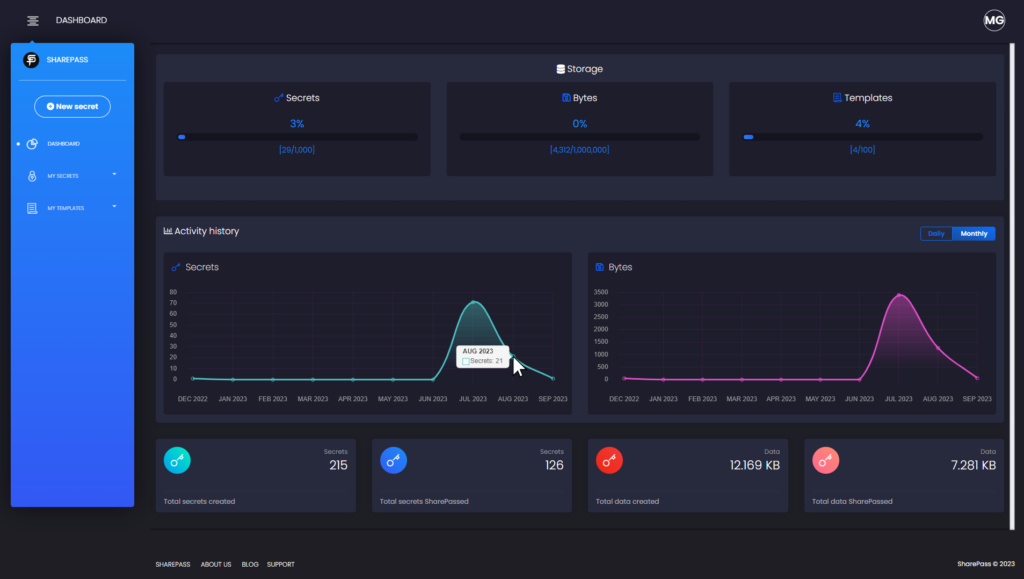
The SharePass dashboard offers a comprehensive and intuitive interface that puts you in control of your sensitive data. It provides you with key insights into your account’s activity, storage, and usage, all in one centralized location.
Dashboard Features:
- Storage Metrics: Keep track of your storage usage with detailed metrics. The dashboard displays the number of secrets, the amount of data in bytes, and the number of templates in your account.
- Activity History: Gain insights into your account’s daily and monthly activity. The dashboard presents an overview of the secrets and data you’ve created and shared, allowing you to monitor your sharing trends.
- Account Details: Easily access essential account statistics, including:
- Total Secrets Created: The cumulative number of secrets you’ve generated.
- Total Secrets SharePassed: The count of secrets successfully shared.
- Total Data Created: The collective amount of data generated within your account.
- Total Data SharePassed: The data successfully shared with recipients.
Understanding Data Metrics:
Total Data Created: This metric encompasses all the data you’ve generated within SharePass, whether or not it has been shared. It reflects the overall volume of content you’ve produced using the platform.
Total Data SharePassed: This metric represents the data that you’ve not only created but also successfully delivered to recipients. It signifies the data that has been sent, received, and acknowledged.
In a nutshell, the dashboard equips you with real-time insights to effectively manage your data sharing activities, optimize your storage, and make informed decisions regarding your data management strategy.