Webhooks
SharePass understands the importance of real-time data integration for your organization. Webhooks are a powerful feature that enables seamless communication and data sharing between SharePass and your external systems, applications, or services.
What Are Webhooks?
Webhooks are automated notifications sent from SharePass to an external URL or endpoint in real-time. They serve as event-driven triggers, instantly informing your integrated systems about specific actions or events within SharePass. This communication is crucial for keeping your external applications up-to-date with the latest information from SharePass.
Webhooks and SHA-256 Signature for Verification
SharePass provides a robust and secure method to verify the authenticity of incoming webhooks by employing the SHA-256 hashing algorithm on the combination of the payload and an optional secret. This signature mechanism ensures that webhook data received from SharePass remains unchanged and genuine.
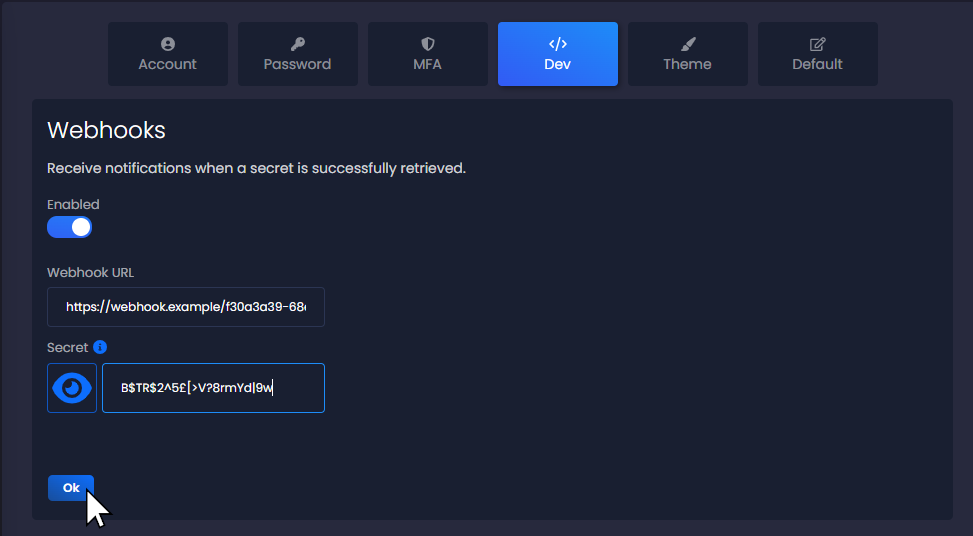
How Does It Work?
When SharePass triggers a webhook, it generates a unique signature for that specific event. This signature is based on the data payload included in the webhook, but it can also incorporate an optional secret that you, as a developer, can configure under the Dev tab in your SharePass account settings.
Here’s how the verification process unfolds:
- Webhook Trigger: An event occurs in SharePass, such as the successful opening of a shared secret, a webhook is triggered.
- Data Payload: SharePass prepares a data payload containing relevant information about the event.
- Signature Generation: If you’ve configured a secret in your SharePass account settings, SharePass will include this secret in the signature calculation. The formula for this checksum is: signature = sha256 (payload + secret). However, if you haven’t set a secret, the signature is calculated solely based on the payload.
- HTTP POST Request: SharePass sends an HTTP POST request to your configured external URL or endpoint. Along with the payload, the POST request includes the generated signature in the header.
- Verification: On your end, you can verify the authenticity of the webhook by calculating the signature yourself. You retrieve the payload and any optional secret you might have configured (which is known only by you).
- Comparison: Next, you calculate a signature using the same formula as SharePass: signature = sha256 (payload + secret). Once again, if you haven’t configured a secret, your calculation will be based only on the payload.
- Validation: Finally, compare the signature you calculated with the signature value included in the header of the incoming HTTP POST request. If they match, you can be confident that the webhook is legitimate.
The optional secret for webhook verification provides an additional layer of security, ensuring that incoming webhook data is both genuine and unaltered. It allows you to confirm the authenticity of webhook requests which is why it is highly recommended to configure a strong secret for the signature calculation.
Below there is an example of a webhook received. Notice the the ‘signature’ on the header of the HTTP request.
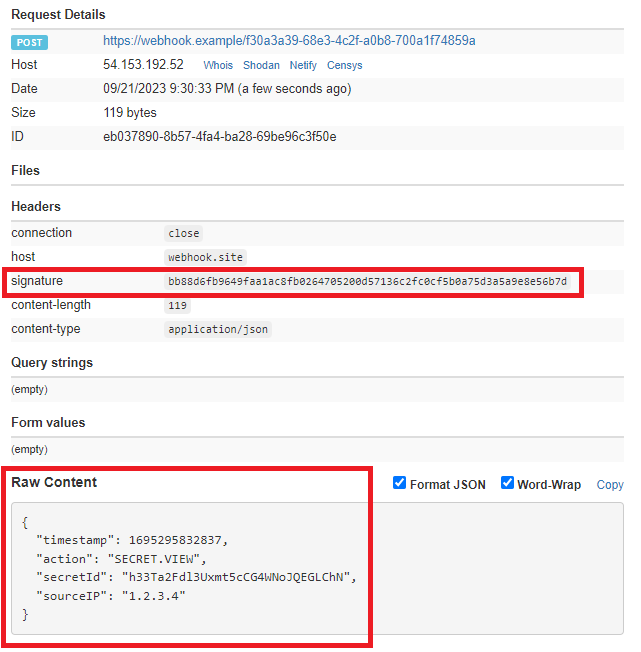
In summary, SharePass offers the option to include an optional secret for webhook verification. By calculating and comparing the signature values, developers can ensure that webhook data received from SharePass is legitimate and unmodified, contributing to the overall security of your data integration processes.