The ability to prove your identity is authentication, and it was never more critical than now. We authenticate ourselves online every day, many times a day.
Today, every person needs to consider the dangers and risks involved if another entity takes over their social media account, bank account, or other online accounts. The risks vary from one individual to another, and as much as it sounds complicated, each person must have a risk management strategy to better their online security profile. If you don’t have the skills or knowledge, I’d suggest consulting a professional on this matter as you would consult a professional to secure your home if you didn’t feel safe living in it.
Let’s take an example; what happens if someone else logs in to one of your social media accounts? That person can pretend to be you and act on your behalf to execute malicious activity that can ruin your reputation, take advantage of your connections, shame you, and the list goes on.
So, when you are planning to strengthen your online security, a known dilemma arises “security vs usability”. The higher security standards you implement, the less user-friendly the everyday operations become, driving low adoption and making it less usable.
To implement good online security for individuals and companies, you must implement strong authentication, including MFA — Multi-Factor Authentication. True MFA should use different categories as having two passwords (two things you know) may slightly increase your security but is not considered a real MFA which should be comprised of at least 2 out of 3 different categories:
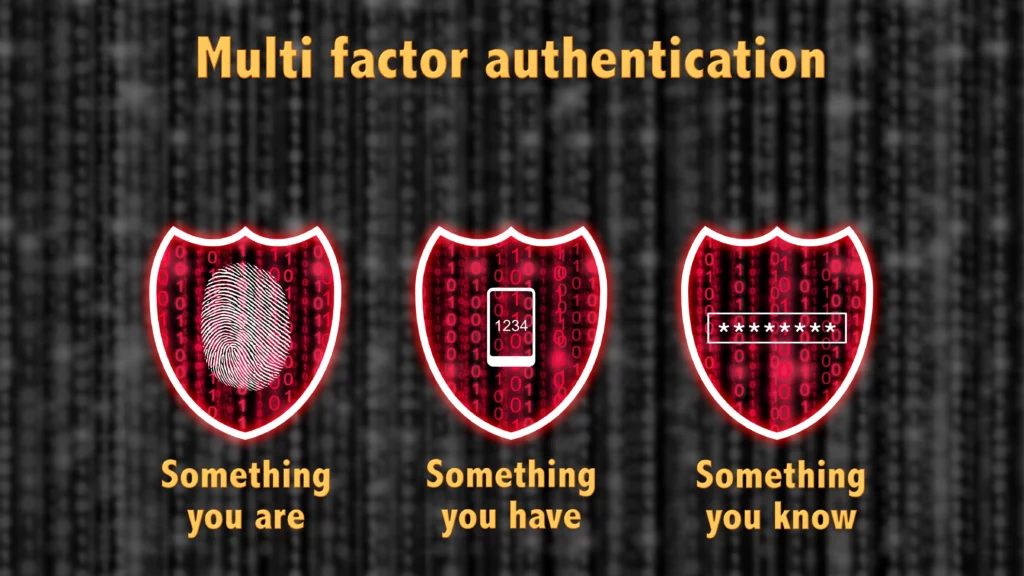
1. What you have (includes items that are physical objects):
- NFC Tags
- Mobile device
- Smart card
- USB drives
- Token devices
Challenge: This form of authentication needs to be carried with you and could be easily forgotten, lost, broken, and stolen. Physical devices are also hard to maintain and require some form of initial enrolment (physical access needed for configuration, then they need to be shipped or picked up by the end-user).
2. What you are (biometrics):
- Voice — Speaker authentication by voice
- Fingerprint Recognition
- Eyes — iris or retina recognition
Challenge: Usually requires high maintenance and expensive systems that still have vulnerabilities. The adoption rates within specific sectors are still prolonged. Biometrics require high maintenance and requires central enrolment and management policies. Some companies are trying to implement these new solutions calling it “Passwordless” authentication — more about this later.
3. What you know (anything you can write or dictate):
· Passwords — are most widely used by most users because it’s the easiest to implement; it also happens to be the easiest to take advantage of if not managed, used, shared, or maintained correctly. In contrast to reality, passwords need to be managed like keys to your home; hence they are sometimes referred to as “keys”. You usually wouldn’t share your key with a stranger or leave it unattended. Still, with passwords, users feel more comfortable doing so, which creates a massive challenge for companies to implement proper security.
· PINs and combinations — much less secure than passwords as they usually require 4–8 digits which are ten folds less secure, you can measure how long it takes to crack 6-digit code in brute force here: https://sharepass.com
· Secret questions or phrases — are usually used for phone identification, so it’s not an actual authentication method. It would be best if you never relied on this option as something like “What was the name of your first school?” can be easily gathered from social engineering attacks or hints you left online without thinking about it.
Challenge: sometimes easy to guess, very sensitive to mismanagement, very weak if poorly maintained, doesn’t require physical element which makes it easy to use everywhere.
For creating a good security standard, it is recommended to implement 2 out of 3 categories. It depends on who you are, where you work, the sensitivity of the data, standards, and compliance. Important note: It is better to have one category implemented well than two implemented poorly to comply with online security standards. Online security should never be primarily about compliance but more about practical implementation and understanding of the real-time system vulnerabilities and how to address them while keeping up with the latest online security trends.
Picking up on a topic I mentioned earlier, a new concept is on the rise — “Passwordless authentication”, which sounds excellent and is probably the future. Still, we are a long way from implementing it across all industries. “Passwordless” means authenticating you without the use of traditional passwords and was recently announced and adopted by Microsoft. The reality is that in the backend, there is always a password or key or hash to fall back on in case the biometric or other methods fail, so after all, “Passwordless” means relying less on passwords by default. The passwords are left to be managed by skilled and qualified security professionals who follow the relevant security policies as it is part of their job.
Now that we established that passwords are here to stay for the foreseeable future, we understand that password managers are essential to keep these passwords safe. Yet, it also introduces a massive risk: what if the password manager account gets compromised? How should it be protected?
Traditionally, to login to a password manager, you would use a password or combination or a PIN which is not enough as you rely on one factor. Even a password with SMS as a second factor is not enough. I think the use of all three categories is required here to authenticate. For example, a password, combined with a fingerprint and a USB physical token, guarantees an absolute protection to your password manager. The unauthorised access or breach to your password manager will be a “game over” to your whole security strategy and not only that.
SharePass is mitigating this risk by leveraging a “Zero Trust”, “Passwordless” solution. In an unlikely event where someone gains access to your SharePass account, he can’t see any passwords, he can see only logs and different options to apply on the shared passwords, but no passwords are present.
References:
https://www.biometricsinstitute.org/what-is-biometrics/types-of-biometrics/
https://www.globalknowledge.com/us-en/resources/resource-library/articles/the-three-types-of-multi-factor-authentication-mfa/#gref
https://www.helpnetsecurity.com/2021/05/20/passwordless-not-always-passwordless/